Free call sheet template for film and video (Excel and PDF)
A one-page day sheet, a scene x cast breakdown and a filled example. Direct download, no email or sign-up.

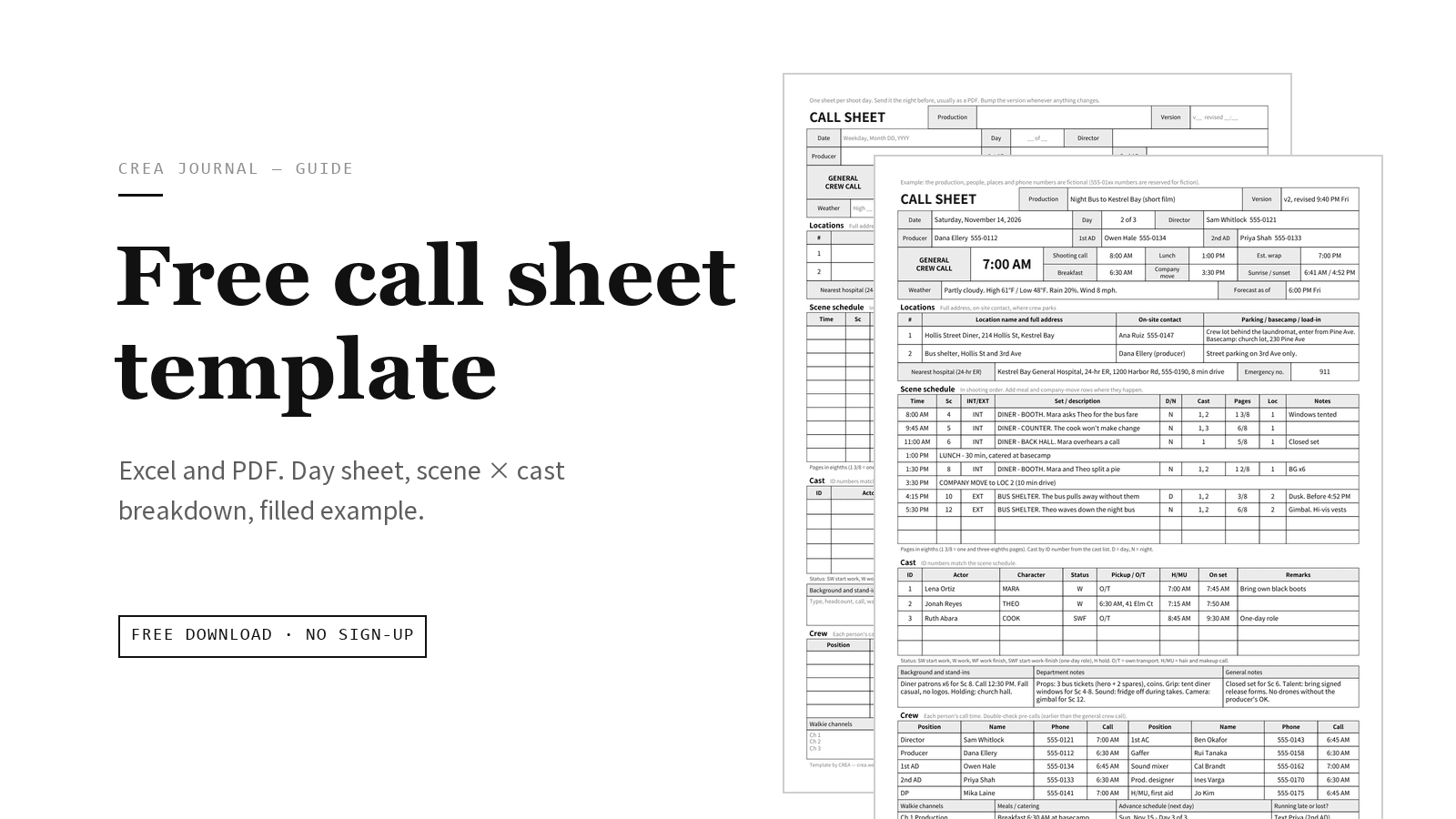
Free call sheet template for film and video shoots, as an Excel workbook and an A4 PDF. Both links download the file directly: no email form, no account.
Download the call sheet template
| File | What's inside | Format |
|---|---|---|
| Call sheet template (Excel, .xlsx) | Blank call sheet, scene x cast breakdown, filled example | A4, 3 sheets |
| Call sheet template (PDF, A4) | Blank call sheet and blank scene x cast grid for filling in by hand, plus the filled example | A4, 3 pages |
- License: free for personal and commercial use. Modify freely; no attribution required.
- Opens in: Excel, Google Sheets (upload it to Google Drive, then Open with > Google Sheets), Apple Numbers and LibreOffice. Outside Excel, spacing may shift slightly.
- Paper: A4 portrait. On US Letter, print the PDF with "Fit to page" (about 94%) or the edges get clipped. In the .xlsx, set Page Layout > Size to Letter and the sheets rescale to fit.
- Updated: October 2026.
The PDF has no form fields: type into the .xlsx, or print the PDF and write on it.
For what goes in each box and why, read How to make a call sheet for film and video.
What's in the template
Sheet 1: Call sheet (blank)
One shoot day on one A4 page (Excel prints it on a single page). From top to bottom:
- Header, times and weather: production, version, date, Day __ of __, director, producer and ADs. The general crew call gets the biggest box, then shooting call, lunch, est. wrap, breakfast, company move, sunrise / sunset, and the forecast with its "as of" time.
- Locations: two rows (address, on-site contact, parking / basecamp / load-in), the nearest hospital with a 24-hour ER (A&E in the UK), and the emergency number.
- Scene schedule (10 rows) and cast (5 rows), with legends for page eighths and the status codes: SW start work, W work, WF work finish, SWF start-work-finish (a one-day role), H hold, O/T own transport, H/MU hair and makeup.
- Notes and crew: background and stand-ins, department notes, general notes, 10 crew slots, then walkie channels, meals, the next day's advance schedule and "Running late or lost?"
Sheet 2: Scene x cast breakdown
One row per scene, one column per cast member: who is in which scene across the whole script. It is not a Day Out of Days, which tracks each actor across shoot days once scenes are scheduled.
- Columns: scene, I/E, set / location, D/N, pages, shoot day, cast #1 to #8 (character names printed sideways), BG, props, wardrobe, SFX / equipment, notes.
- Marks: the cast ID number (or an X). V means voice only or off screen.
- In Excel: 60 rows, dropdowns for I/E and D/N (including dawn and dusk), a frozen header that repeats on every printed page, and bottom rows that count scenes and pages per cast member, plus the page total. The first two rows (in grey) and the character names MARA, THEO and COOK are sample entries; type over them.
- PDF page 2: the same grid with 32 blank rows, to fill in by hand at the table read.
Sheet 3: A filled-in call sheet example
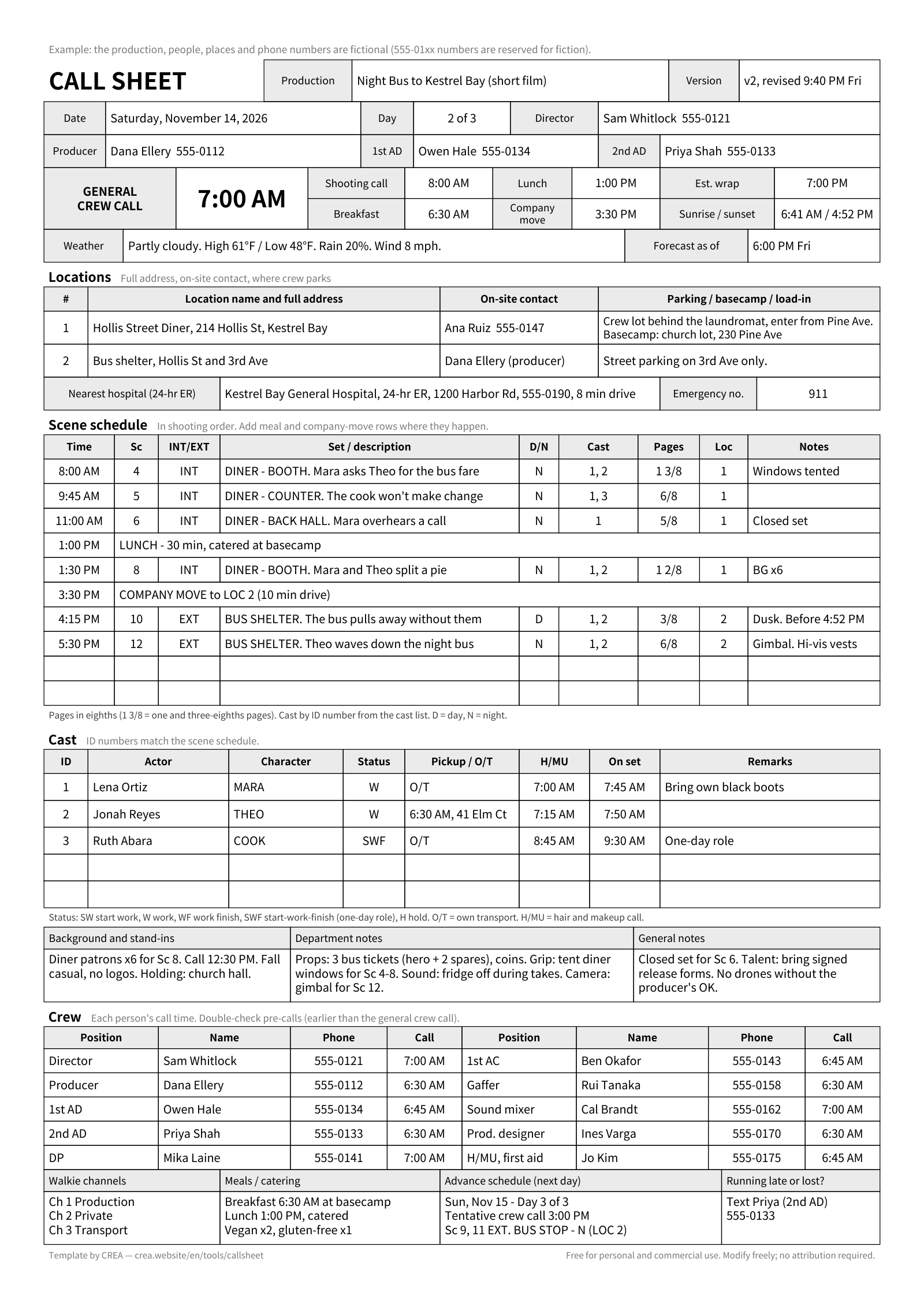
Sheet 1 filled in for day 2 of 3 on Night Bus to Kestrel Bay, an invented short film. Every person, place and phone number is made up (555-01xx numbers are reserved for fiction). Its scene schedule:
| Time | Sc | INT/EXT | Set / description | D/N | Cast | Pages | Loc |
|---|---|---|---|---|---|---|---|
| 8:00 AM | 4 | INT | DINER - BOOTH. Mara asks Theo for the bus fare | N | 1, 2 | 1 3/8 | 1 |
| 9:45 AM | 5 | INT | DINER - COUNTER. The cook won't make change | N | 1, 3 | 6/8 | 1 |
| 11:00 AM | 6 | INT | DINER - BACK HALL. Mara overhears a call | N | 1 | 5/8 | 1 |
| 1:00 PM | LUNCH - 30 min, catered at basecamp | ||||||
| 1:30 PM | 8 | INT | DINER - BOOTH. Mara and Theo split a pie | N | 1, 2 | 1 2/8 | 1 |
| 3:30 PM | COMPANY MOVE to LOC 2 (10 min drive) | ||||||
| 4:15 PM | 10 | EXT | BUS SHELTER. The bus pulls away without them | D | 1, 2 | 3/8 | 2 |
| 5:30 PM | 12 | EXT | BUS SHELTER. Theo waves down the night bus | N | 1, 2 | 6/8 | 2 |
The rest of the example shows details people forget: the forecast time, the hospital's drive time, a one-day actor marked SWF, diner windows tented to shoot night interiors by day, scene 10 (the only daylight exterior) set to finish before the 4:52 PM sunset, and a late-or-lost contact who is the 2nd AD, not the director.
How to fill it in fast
- Make a master copy with what stays the same for the whole shoot: title, director, producer, ADs, crew list, walkie channels.
- Use one tab per day. Copy the sheet (Excel: right-click the tab > Move or Copy > Create a copy; Google Sheets: right-click the tab > Duplicate), name it
Day 2 v1, and change only what's different. - Fill in sheet 2 once, when the script is locked. Each day's schedule rows then copy across: scene number, I/E, D/N, pages, cast IDs.
- Then the times. Set the shooting call and the general crew call. For each actor, start from when their first scene should roll and work backwards: on-set time, then hair and makeup, then pickup. In the example, the cook's first scene is at 9:45 AM, so her makeup call is 8:45 AM, not the 7:00 AM crew call.
- Last, what changes overnight: the weather and its "as of" time, sunrise and sunset, location changes.
- Check local details. The emergency number box is blank on purpose: 911 in the US and Canada, 999 or 112 in the UK, 112 across the EU, 119 for an ambulance in Japan. Write temperatures in the unit your crew uses (°F or °C).
Two spreadsheet quirks:
- Fractions turn into dates. Excel and Google Sheets read
6/8as a date. On sheet 1, type an apostrophe first ('6/8) and it stays as text. On sheet 2, type decimals so the totals can add them up (3/8 = 0.375, so 1 3/8 is 1.375); the cell still shows eighths. - Adding rows. The layout uses merged cells, so copy an existing row and insert the copy (Excel: right-click a row number > Insert Copied Cells); a plain new row comes out unmerged. If sheet 1 then prints too small, set Page Layout > Scale to Fit to 1 page wide by 2 tall.
Exporting and revising the template
- Export only the day's sheet as a PDF, and send that, not the .xlsx. In Excel, check that the export covers the current sheet, not the whole workbook. In Google Sheets: File > Download > PDF, then "Current sheet", your paper size and "Fit to page".
- Name the file with the day and version, for example
NightBus_CallSheet_Day2_v2.pdf, so people can find it in a chat. - Copy the tab before you edit (
Day 2 v1, thenDay 2 v2), so the version you sent stays as it was. Update the version and revised time in the header (v2, revised 9:40 PM Fri), and replace the one-line instruction in row 1 with what changed:REVISED v2 (Fri 9:40 PM): Sc 8 moved after lunch. Est. wrap now 7:00 PM.
When to send it, how to reissue changes and when to make a separate cast version are covered in How to make a call sheet.
A faster way: CREA's call sheet tool
The spreadsheet is fine for one-off shoots. On longer ones, the time goes into retyping the scene table every evening and finding out who has read the latest version.
CREA's call sheet tool is free. You need a free account to make sheets; your crew doesn't need one to read them. It doesn't import this Excel file, so you type the first sheet once and duplicate it from then on.
- The next day from a copy: "Duplicate as new" moves the day number up and clears the date.
- Sun and weather: with a date and a place name, it fills in empty sunrise, sunset and weather fields without overwriting what you typed. Forecasts exist only for dates about 16 days ahead or less.
- A link that stays the same between versions: publishing gives you a link to paste into the group chat, alongside the PDF. Edits stay in draft until you publish a new version; from version 2, a banner names what changed. Logged-in crew are marked as read automatically, others once they tap their name. The link page has the date, calls, scenes, schedule, crew phone numbers (tap to call), sun times, parking, hospital and safety notes, but not the location address or the weather, so put the address in your message or send the PDF too.
- Scenes from your planning: if your scene breakdown, shot list and rundown (the day's running order) are in the same project, and the sheet's date is a shoot day with shots scheduled on it, the scene table and the day's props and wardrobe list fill in from them. Open those three from the tool bar at the top of the call sheet editor: each tool page's own Start button opens a separate project, and a call sheet can't read shots from another project.
FAQ
Is there a Word or Google Docs version?
No. The .xlsx opens in Google Sheets, and the PDF prints from any computer.
Can I use it on paid jobs and change it?
Yes. It's free for personal and commercial use, you can modify it, and attribution is not required, so you can remove the small "Template by CREA" line in the Excel file.
Does it work for a music video or a photoshoot?
Yes. A small crew can leave walkie channels, background and most department notes empty; keep the times, location, hospital, schedule, cast and crew. On a music video, note the playback file and who brings the speaker. A one-day shoot can skip sheet 2.
If you also need a shot list or storyboard sheets, the free storyboard and shot list templates include a shot list example from the same fictional film, so the scene numbers match. And when retyping the sheet every evening starts to take longer than planning the day, try the call sheet tool in CREA.