Free storyboard and shot list templates for film (PDF, Excel)
Printable A4 storyboard sheets in 16:9, 9:16 vertical, 2.39:1 and 4:3, and an Excel shot list with a filled example. Direct downloads, no email, free for commercial use.

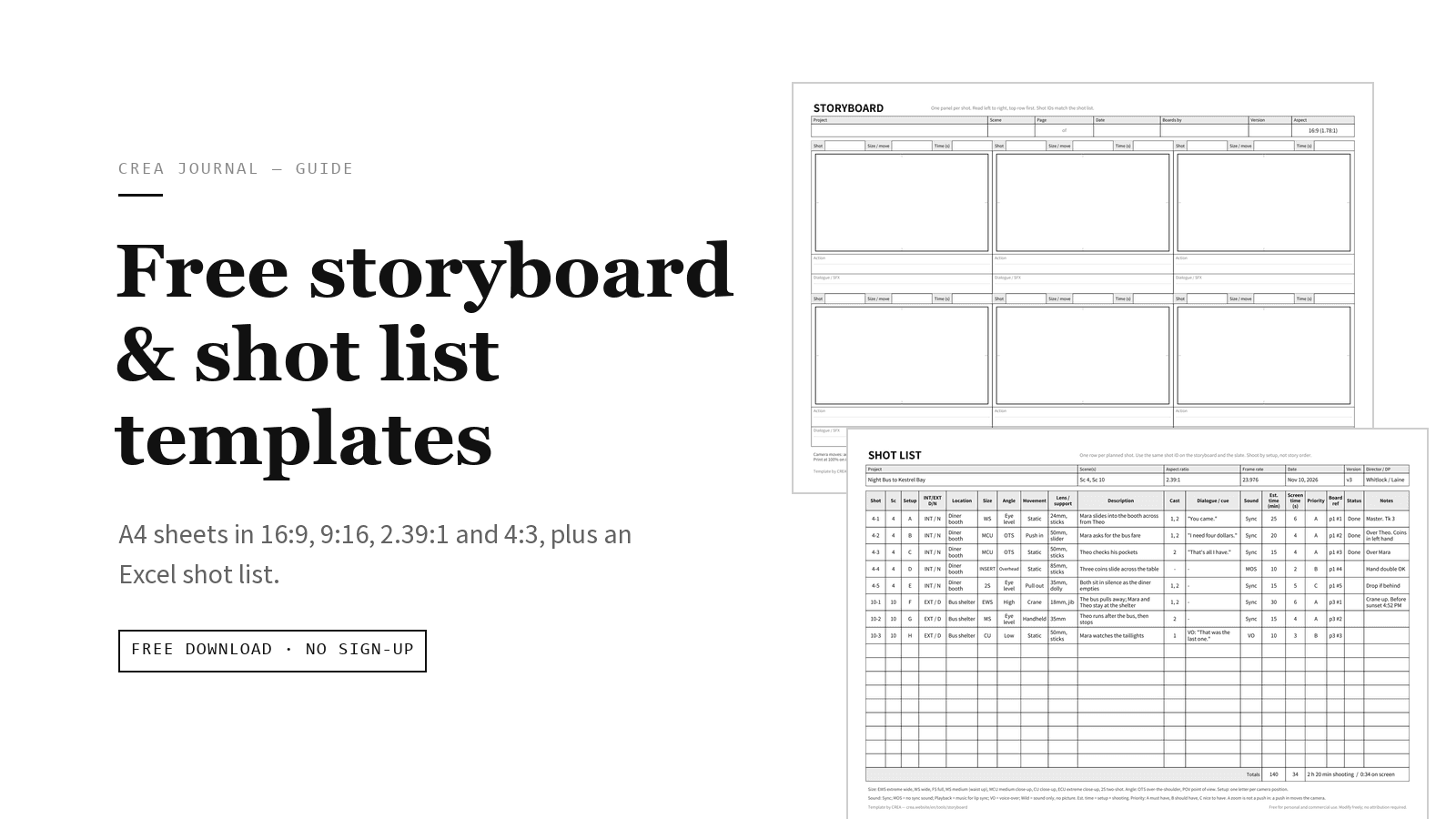
These storyboard and shot list templates are free for personal and commercial use, and you may modify them; attribution is not required. The links below go straight to the files: no email, no account.
Download the templates
| Download | Paper | Layout |
|---|---|---|
| Storyboard 16:9 (1.78:1), PDF | A4 landscape, 1 page | 6 panels, 3 × 2 |
| Storyboard 9:16 vertical, PDF | A4 portrait, 1 page | 6 tall panels, 3 × 2, app-overlay guides |
| Storyboard 2.39:1 scope, PDF | A4 portrait, 1 page | 5 rows: shot, frame, action / dialogue, time |
| Storyboard 4:3 (1.33:1), PDF | A4 landscape, 1 page | 6 panels, 3 × 2 |
| Shot list, Excel (.xlsx) | A4 landscape, 1 page wide | 40 blank rows + filled example |
All PDFs are A4: print at 100% ("Actual size"). On US Letter, choose "Fit to page" (about 94%); the frames get slightly smaller but keep their ratio. The .xlsx opens in Excel, Google Sheets (upload it to Google Drive, then Open with > Google Sheets), Numbers and LibreOffice; spacing may shift slightly outside Excel. Files updated October 2026.
New to boarding? How to make a storyboard and shot list walks through the method with a worked example, and Storyboards vs shot lists explains which one you need. The call sheet template is in Free call sheet template.
What's on each storyboard sheet
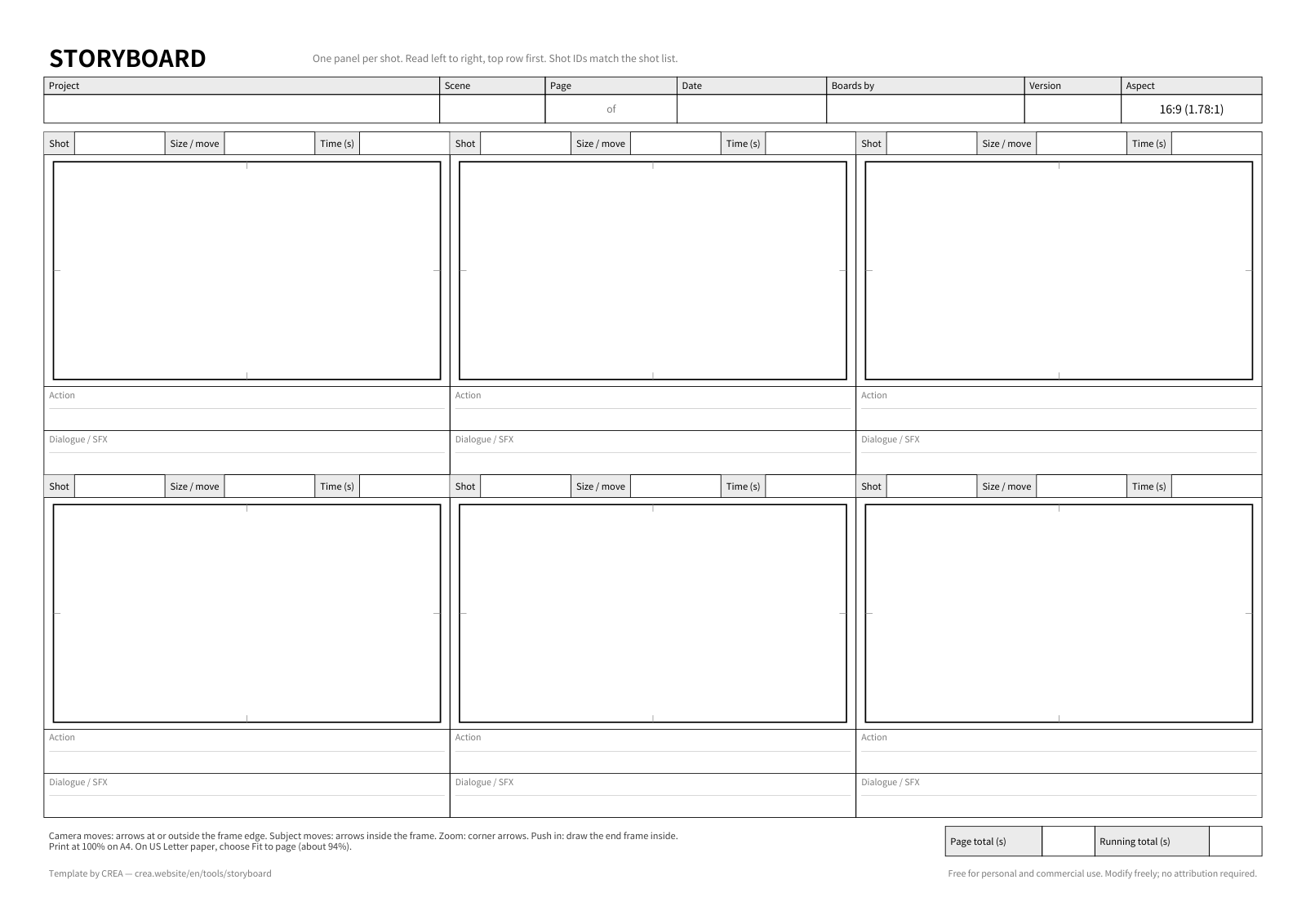
All four sheets share the same header and footer:
- Header: Project, Scene, Page x of y, Date, Boards by, Version, and the aspect ratio printed in the corner, so a photocopy still says what shape it is.
- Footer: Page total (s) and Running total (s) boxes, and a short arrow legend: camera moves at or outside the frame edge, subject moves inside, zoom as corner arrows, push in as a smaller end frame drawn inside.
- Frames: drawn at the exact ratio, with a small tick at the middle of each edge to help you center a subject or place the horizon.
- Each shot: Shot ID, Time (s), the frame, and lines for Action and Dialogue / SFX. The 16:9, 9:16 and 4:3 sheets also have a Size / move box above each frame. On the 2.39:1 sheet, write size and move at the start of the Action line.
16:9 storyboard template (1.78:1)
Six panels on a landscape page, each frame 88 × 49.5 mm. Use it for YouTube, corporate and commercial work, TV and most online video. There is no separate file for the 1.85:1 "flat" theatrical ratio: use this sheet and rule a thin line about 1 mm in from the top and bottom of each frame.
Vertical 9:16 storyboard template (Reels, TikTok, Shorts)
Six tall panels on a portrait page, each 52 × 92.4 mm. Dashed lines mark roughly where apps put their top bar, captions and buttons: a band at the top, a deeper one at the bottom and a strip down the right. These vary by platform and app version, so treat them as a reminder to keep faces and text clear of the edges, not as an exact safe zone.
2.39:1 scope storyboard template
Five rows on a portrait page: Shot | Frame (100 × 41.8 mm) | Action and Dialogue / SFX | Time (s). The writing sits beside the wide frame, which gives dialogue more room. Use it for short films and music videos going for a wide, cinematic look. Scope is often written 2.35:1; this is the sheet for that too.
4:3 storyboard template (1.33:1)
Six panels on a landscape page, each 68 × 51 mm, with two action lines and one dialogue line. Today 4:3 is a style choice rather than a TV standard: a retro or archival look, some music videos and fashion films.
One shoot, two deliveries
If a 16:9 film also needs a 9:16 cut, draw the vertical crop on the 16:9 sheet as a dotted box about 28 mm wide inside each frame. Shots that don't survive the crop show up at once.
What's in the shot list template
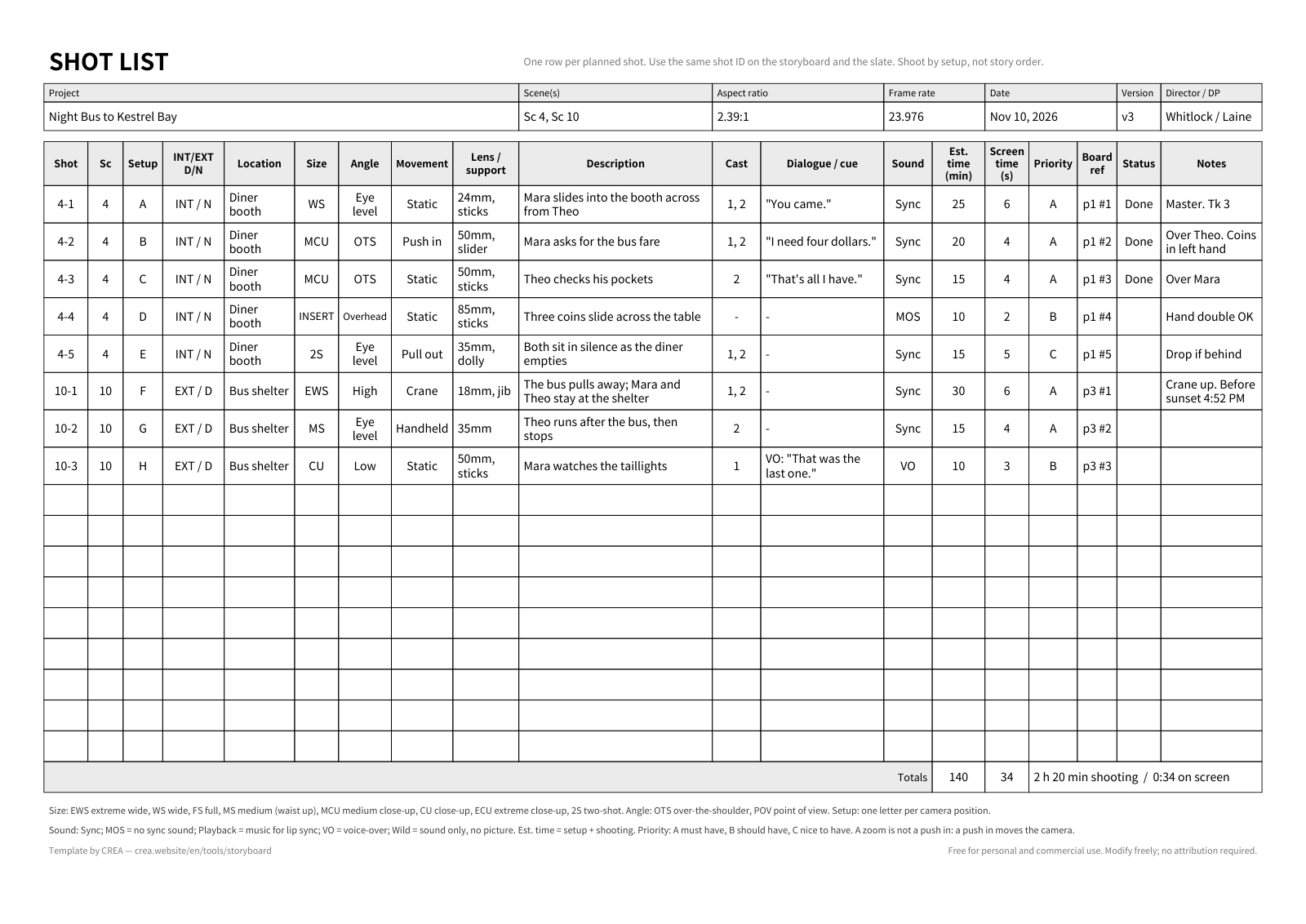
The Excel file has two sheets: Shot list (blank, 40 rows) and Shot list example (filled in). One row is one planned shot.
- Header fields: Project, Scene(s), Aspect ratio, Frame rate, Date, Version, Director / DP.
- Columns: Shot, Sc, Setup, INT/EXT D/N, Location, Size, Angle, Movement, Lens / support, Description, Cast, Dialogue / cue, Sound, Est. time (min), Screen time (s), Priority, Board ref, Status, Notes.
- Dropdowns for INT/EXT D/N, Size, Angle, Movement, Sound (Sync, MOS, Playback, VO, Wild), Priority (A, B, C) and Status (Not shot, Done, Dropped). You can still type your own value in any of them.
- Totals row adds up Est. time and Screen time, for example "2 h 20 min shooting / 0:34 on screen".
- Printing: the header row repeats on every page, and a legend of abbreviations and sound codes sits at the bottom.
Four columns do most of the planning work:
- Setup: one letter per camera position. Shoot by setup, not in story order: group the shots that face the same way and finish them before you turn around and relight.
- Est. time: setup plus shooting, in minutes. The total tells you early whether the day is realistic. It is camera time only: add company moves, meals and load-in on top, and allow extra for the first lighting setup at each location.
- Priority: A must have, B should have, C nice to have. When the day runs late, the C shots are the first to be dropped, and nobody has to argue about it.
- Board ref: the storyboard page and panel (p1 #2), so the list and the drawings point at each other.
The example sheet is a fictional short film, Night Bus to Kestrel Bay: eight shots across scene 4 (a diner booth at night) and scene 10 (a bus shelter by day). Each shot is its own camera position, so the setups run A to H. Three of its rows:
| Shot | Setup | Size / angle | Movement | Lens / support | Description | Sound | Est. min | Priority |
|---|---|---|---|---|---|---|---|---|
| 4-2 | B | MCU, OTS | Push in | 50mm, slider | Mara asks for the bus fare | Sync | 20 | A |
| 4-4 | D | INSERT, overhead | Static | 85mm, sticks | Three coins slide across the table | MOS | 10 | B |
| 10-1 | F | EWS, high | Crane | 18mm, jib | The bus pulls away; Mara and Theo stay at the shelter | Sync | 30 | A |
The insert is MOS (no sync sound) because nothing in it needs dialogue, and it's priority B: a useful detail, but the scene still works without it. The Notes column on 10-1 says "Crane up. Before sunset 4:52 PM": time-sensitive details belong there, where the 1st AD will see them. Wild in the Sound list means sound with no picture: to get a clean recording of the bus pulling away for the edit, give it its own row marked Wild.
Using them on set
- Board in story order, shoot from the list. Keep the storyboard pages in story order. Order the shot list by setup (all of one direction, then the turnaround), then by priority within each setup.
- One shot ID everywhere. Use the same ID on the panel and the shot list row. The example uses scene-dash-shot (4-2); scene plus letter (4B) works just as well. Before day one, agree with the script supervisor or 2nd AC how it maps to the slate. US slates usually read scene plus letter.
- Split the paperwork by role. The director and DP carry the board pages. The 1st AD (on a small crew, whoever runs the day) carries the shot list and marks each shot Done or Dropped as the day goes. The script supervisor logs the circled take; without one, the 2nd AC or the director calls it and it goes in Notes ("Tk 3").
- Check the length before the shoot. Fill in Time (s) on every panel. For a 15-, 30- or 60-second spot, the running total on the last page has to match.
Printing tips
- Sketch in pencil, then go over the final lines in dark pen before you scan or photocopy. Light pencil tends to disappear in copies.
- On a tablet, open the PDF in any app that lets you write on PDFs. The frames stay at the right ratio.
- For the shot list on Letter paper, switch the paper size in the print dialog. The sheet is set to fit one page wide, so the columns re-fit.
A faster way: the board and the list in one place
If you'd rather not keep paper and a spreadsheet in sync, CREA's free shot list tool holds the storyboard and the shot list in one table:
- Type one line per shot and press Enter. Shot numbers count up on their own in scene-plus-letter style (1A, 1B); if you plan to move to CREA, number the paper board the same way.
- Draw each frame on a sketch pad in the project's aspect ratio: 16:9, 2.39:1, 1:1, 4:5, 3:4 or 9:16. There is no 4:3 setting, so keep the paper sheet for that.
- Play the frames in order as an animatic, each held for its duration. It's a preview, not a video export.
- Export a landscape A4 shot list PDF with the reference image and the storyboard frame in their own columns.
- Give a shot a shoot day and it joins that day's rundown (the running order). A call sheet for that date, in the same project, builds its scene list from the rundown. Each tool page's start button opens its own project, so start once and switch tools from the bar at the top of the editor.
It doesn't import this Excel file, so choose one place to keep the plan. The tools need a free account.
Print a sheet, number your shots, and you have a plan the whole crew can read. When you want the board, the list and the schedule in one place, start a shot list in CREA.