How to make a call sheet for film and video, with examples
What goes in each section, with example lines from a fictional short film, the mistakes that make people late, and how to send and revise the sheet.

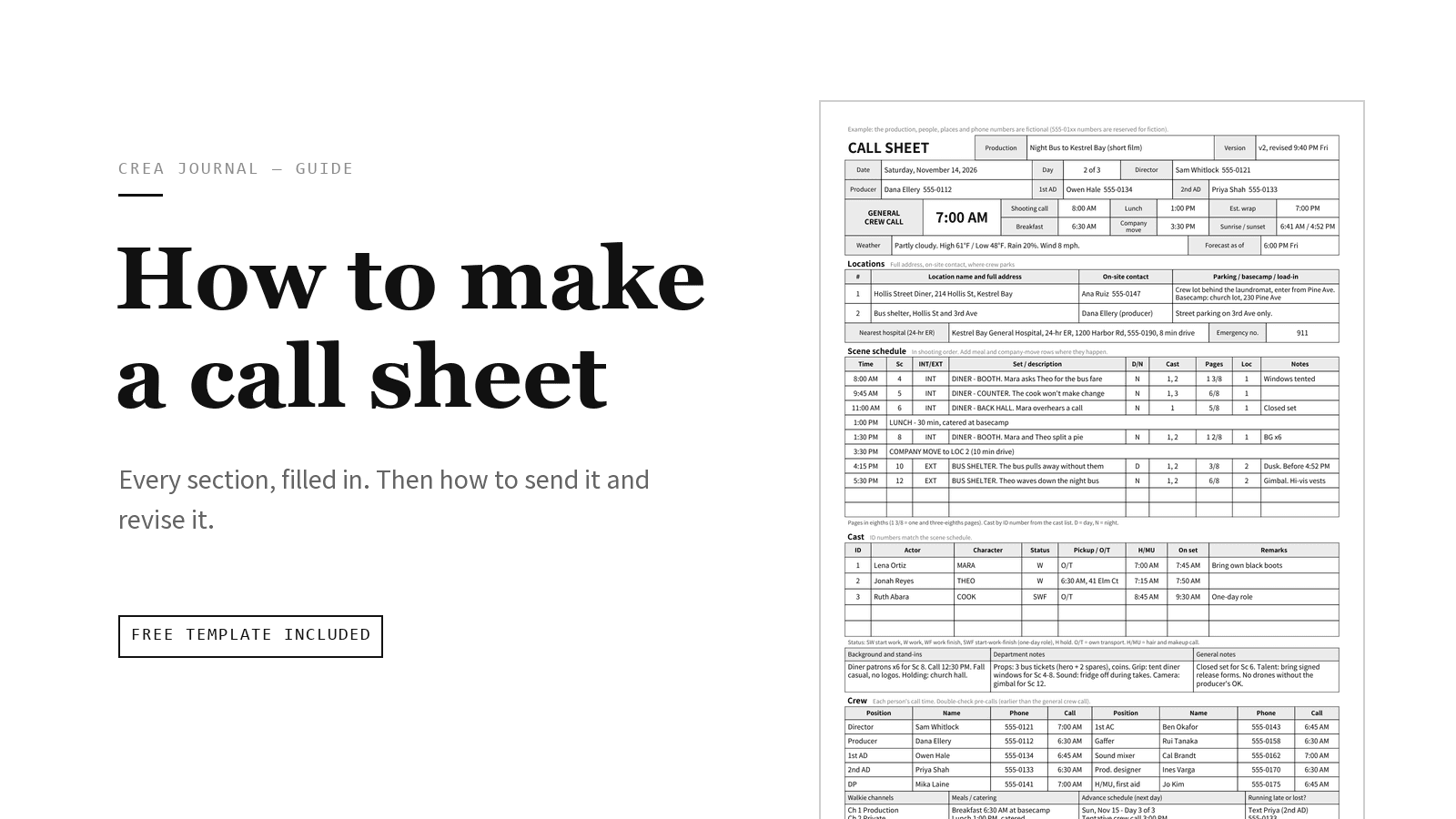
A call sheet is the one- or two-page document for a single shoot day. It goes out the evening before and answers four questions for everyone on the shoot: where do I go, when do I arrive, what are we shooting, and who do I call if something goes wrong. On a feature, the 2nd AD usually writes it and the 1st AD or production manager approves it. On a short film, music video or small commercial, it is often the producer, the production coordinator or the director.
In short: collect tomorrow's agreed scene order, locations and contacts; fill in the header, date, call times, weather, locations, hospital, scene schedule, cast, crew and next-day advance; then send it as a PDF the evening before, and reissue the whole sheet with a new version number whenever something changes.
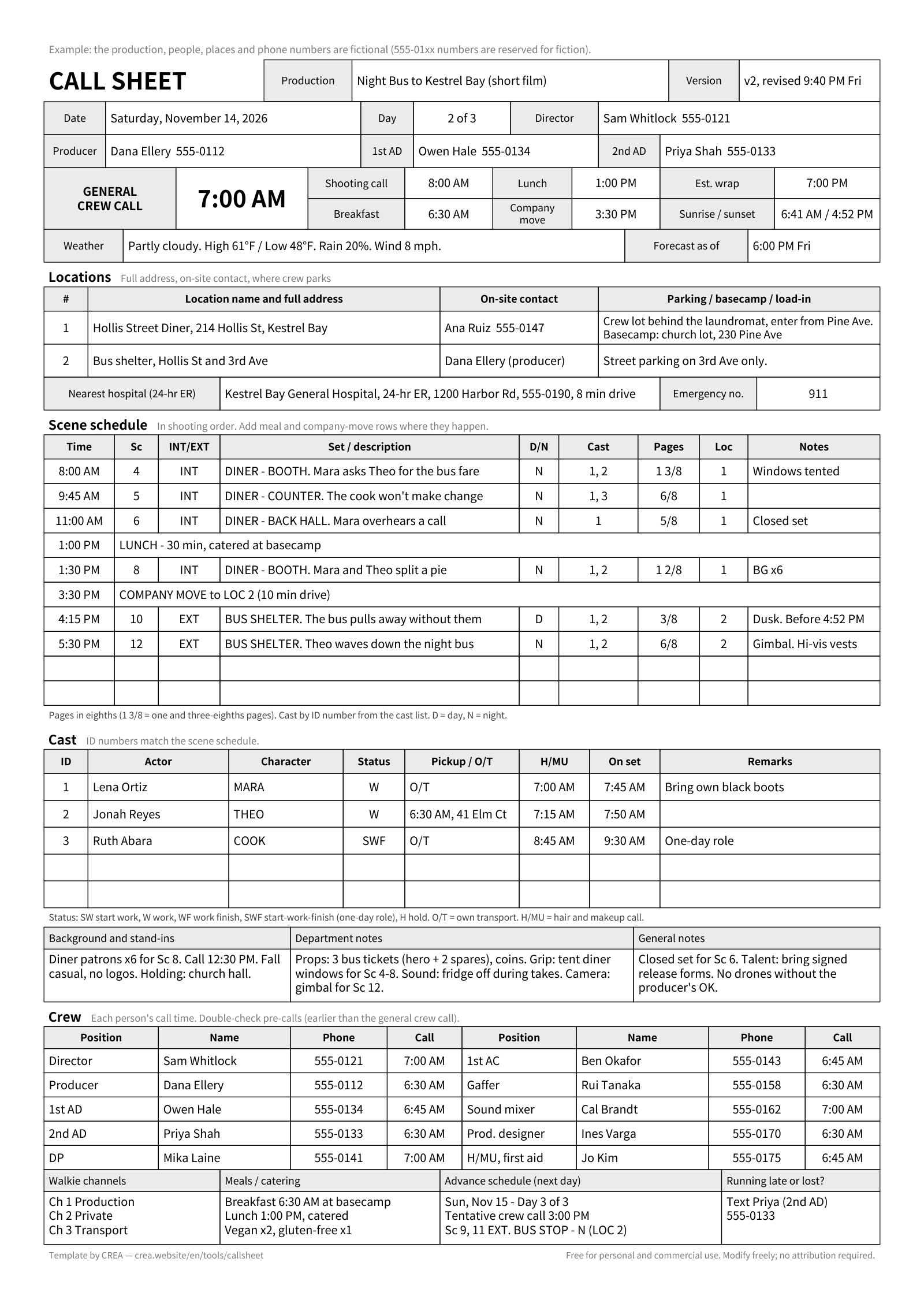
This guide goes through the sections roughly in the order they appear on a typical sheet, front page first: what to write, an example line, why it is there, and the mistakes that cause trouble the next morning. The examples come from an invented short film, Night Bus to Kestrel Bay, on day 2 of a 3-day shoot. Every name, address and phone number in them is made up.
Want to fill one in as you read? Download the free template: call sheet template (Excel, .xlsx) or call sheet template (PDF, A4). Both contain a blank call sheet, a scene x cast breakdown and a filled example. The .xlsx also opens in Google Sheets. If you print the PDF on US Letter paper, choose "Fit to page". File details are in Free call sheet template (Excel and PDF).
Before you start
Collect these first. Writing the sheet is quick once you have them; chasing them at 10 PM is not.
- The day's scene order, agreed with the director and 1st AD (from the shooting schedule or the day's running order)
- Confirmed locations with full addresses, parking and an on-site contact
- Cast and crew lists with phone numbers, and who needs a different call time
- Anything unusual for the day: special props, vehicles, stunts, animals, music playback
- The plan for the next shoot day, even if it is still tentative
A call sheet is not the whole shooting schedule, and it is not the shot list. It covers one day, taken from both. If you haven't made a shot list yet, start with how to make a storyboard and shot list. For the difference between the two, see Storyboards vs shot lists.
What goes on a call sheet, section by section
1. Production header
- Write: project title and type, production company, director, producer and ADs with phone numbers, the call sheet version and when it was last revised.
- Example:
Night Bus to Kestrel Bay (short film) · Call sheet v2, revised 9:40 PM Fri · Dir. Sam Whitlock 555-0121 · Prod. Dana Ellery 555-0112 · 1st AD Owen Hale 555-0134 · 2nd AD Priya Shah 555-0133 - Why: when two versions are going around, the version number is the only way to tell which one is current.
- Common mistakes: no version number. Leaving out the AD's phone number because "everyone has it". The new grip doesn't.
2. Date and day count
- Write: weekday, date with the month written out, and Day X of Y.
- Example:
Saturday, November 14, 2026 · Day 2 of 3 - Why: a date like 11/12 means November 12 to a US crew and 11 December to a UK crew. Writing the month out removes the doubt, and the weekday catches typos: if the date and the weekday disagree, someone will ask in time.
- Common mistakes: copying yesterday's sheet and not changing the date. On night shoots, a call after midnight needs the weekday too (
1:00 AM Sun).
3. General crew call and key times
- Write: the one time most of the crew report, as the largest text on the page. Under it: breakfast (if provided), shooting call (the first shot), lunch, any company move, and the estimated wrap.
- Example:
GENERAL CREW CALL 7:00 AMthenBreakfast 6:30 AM · Shooting call 8:00 AM · Lunch 1:00 PM · Company move 3:30 PM · Est. wrap 7:00 PM - Why: this is the line everyone reads. The key times let departments plan backwards: the gaffer knows how long there is to light before the first shot.
- Common mistakes: mixing up crew call and shooting call. No wrap estimate, even though people plan trains and childcare around it. Many productions break for lunch about six hours after crew call; if yours comes later, flag it next to the lunch time so departments can plan a snack or a second breakfast.
4. Weather and light
- Write: the sky, high and low with the unit, chance of rain, wind, sunrise, sunset, and when the forecast was taken.
- Example:
Partly cloudy · High 61°F / Low 48°F · Rain 20% · Wind 8 mph · Sunrise 6:41 AM · Sunset 4:52 PM (forecast as of 6:00 PM Fri) - Why: exterior scenes depend on light, and people dress for the low, not the high.
- Common mistakes: no unit (°F for US crews, °C almost everywhere else). A forecast with no "as of" time, so nobody knows it is two days old.
5. Locations, parking and access
- Write: a numbered list of locations with the full address, an on-site contact, basecamp (the unit base, in UK terms) if it is not at the set, where to park, and how equipment gets in.
- Example:
LOC 1: Hollis Street Diner, 214 Hollis St, Kestrel Bay · Contact Ana Ruiz 555-0147 · Crew lot behind the laundromat, enter from Pine Ave · Basecamp: church lot, 230 Pine AveandLOC 2 (after the company move): Bus shelter, Hollis St and 3rd Ave · Contact Dana Ellery (producer) 555-0112 · Street parking on 3rd Ave only - Why: most late arrivals are not about the time. They are about the wrong entrance or nowhere to park.
- Common mistakes: a venue name with no street address. A map pin on the front door when the crew needs the loading door. Forgetting the second location after a company move.
6. Nearest hospital and safety
- Write: the nearest hospital with a 24-hour emergency room (not an urgent-care clinic): name, address, phone and drive time from each location. Add the local emergency number (911 in the US and Canada; 999 or 112 in the UK, where the emergency room is called A&E), the first-aider or set medic, and any hazard specific to the day.
- Example:
Kestrel Bay General Hospital, 24-hr ER, 1200 Harbor Rd, 555-0190, 8 min drive · Emergency 911 · First aid: Jo Kim 555-0175 · Sc 12 is a night exterior at a roadside bus shelter: hi-vis vests - Why: if someone gets hurt, nobody should be searching their phone for directions.
- Common mistakes: listing a clinic that closes at 6 PM. Checking the drive time from the first location only.
7. Scene schedule
- Write: the scenes in shooting order, each with a start time, scene number, INT/EXT, the set and a one-line description, D/N, cast numbers, page count in eighths, location number and a short note. Put lunch and company moves in as rows, and total the pages at the bottom.
| Time | Sc | INT/EXT | Set / description | D/N | Cast | Pages | Loc | Notes |
|---|---|---|---|---|---|---|---|---|
| 8:00 AM | 4 | INT | DINER - BOOTH. Mara asks Theo for the bus fare | N | 1, 2 | 1 3/8 | 1 | Windows tented |
| 9:45 AM | 5 | INT | DINER - COUNTER. The cook won't make change | N | 1, 3 | 6/8 | 1 | |
| 11:00 AM | 6 | INT | DINER - BACK HALL. Mara overhears a call | N | 1 | 5/8 | 1 | Closed set |
| 1:00 PM | LUNCH - 30 min, catered at basecamp | |||||||
| 1:30 PM | 8 | INT | DINER - BOOTH. Mara and Theo split a pie | N | 1, 2 | 1 2/8 | 1 | BG x6 |
| 3:30 PM | COMPANY MOVE to LOC 2 (10 min drive) | |||||||
| 4:15 PM | 10 | EXT | BUS SHELTER. The bus pulls away without them | D | 1, 2 | 3/8 | 2 | Dusk. Before 4:52 PM |
| 5:30 PM | 12 | EXT | BUS SHELTER. Theo waves down the night bus | N | 1, 2 | 6/8 | 2 | Gimbal. Hi-vis vests |
| 5 1/8 |
- Why: each department reads down this table to see what it needs and when. Cast numbers link the schedule to the cast list without retyping names. D/N is the time in the story, not on the clock: the diner scenes are night scenes shot in daylight, which is why the windows are tented.
- Common mistakes: scenes in script order instead of shooting order. No page total, which is the quickest way to see whether the day is realistic. Descriptions too vague for anyone to prepare from ("Sc 4 stuff").
8. Cast
- Write: one row per actor working today: cast ID number, actor, character, status, pickup time and place (or O/T), hair and makeup time, on-set time and a remark.
| ID | Actor | Character | Status | Pickup / O/T | H/MU | On set | Remarks |
|---|---|---|---|---|---|---|---|
| 1 | Lena Ortiz | MARA | W | O/T | 7:00 AM | 7:45 AM | Bring own black boots |
| 2 | Jonah Reyes | THEO | W | 6:30 AM, 41 Elm Ct | 7:15 AM | 7:50 AM | |
| 3 | Ruth Abara | COOK | SWF | O/T | 8:45 AM | 9:30 AM | One-day role |
- Why: actors rarely share the crew call. Separate times stop them arriving two hours early, or too late for makeup.
- Common mistakes: giving actors only the crew call. Reading "H" as hair (it means hold). Printing actors' home addresses on a sheet the whole crew receives: a pickup address like the one in row 2 belongs on the version for drivers and the AD.
To see who is in which scene across the whole script, use sheet 2 of the template, the scene x cast breakdown. It is not a Day Out of Days, which tracks each actor across shoot days instead.
9. Background and stand-ins
- Write: type, headcount, call time, wardrobe notes and holding area.
- Example:
Diner patrons x6 for Sc 8 · Call 12:30 PM · Fall casual, no logos · Holding: church hall - Why: extras usually arrive later than the crew, and they need to know what to wear before they leave home.
- Common mistakes: "smart casual" with no detail. No holding area, so extras end up waiting in the shot.
10. Department notes
- Write: one line per department, and only where something is unusual today.
- Example:
Props: 3 bus tickets (hero + 2 spares), coins · Grip: tent diner windows for Sc 4-8 · Sound: fridge off during takes · Camera: gimbal for Sc 12 - Why: this catches the things nobody remembers at 7 AM.
- Common mistakes: repeating the same notes every day until nobody reads them.
11. Communication and meals
- Write: walkie channels (or the group chat name on small shoots), where and when meals happen, and dietary counts.
- Example:
Ch 1 Production · Ch 2 Private · Ch 3 Transport · Breakfast 6:30 AM at basecamp · Lunch 1:00 PM, catered · Vegan x2, gluten-free x1 - Why: catering needs the counts, and someone new needs to know which channel to listen to.
- Common mistakes: collecting dietary needs once and never updating them for people who join later.
12. Advance schedule
- Write: the next shoot day: date, day count, tentative crew call and scenes, in the same columns as today's schedule.
- Example:
ADVANCE · Sun, Nov 15 · Day 3 of 3 · Tentative crew call 3:00 PM · Sc 9, 11 EXT. BUS STOP - N (LOC 2) - Why: a later call tomorrow changes tonight's plans, and departments prep tomorrow's scenes today.
- Common mistakes: leaving it off because "it might change". Mark it tentative instead.
13. Crew list
- Write: crew grouped by department, always in the same order (production, camera, grip and electric, sound, art, wardrobe, hair and makeup and so on). For each person: position, name, phone, and their own call if it differs from the general call. On a two-page sheet, this usually goes on the back.
- Example:
Director · Sam Whitlock · 555-0121 · 7:00 AMandGaffer · Rui Tanaka · 555-0158 · 6:30 AM - Why: it is the phone book for the day.
- Common mistakes: leaving out people who only work one day. Printing personal numbers of people who didn't agree to share them.
14. General notes and footer
- Write: short reminders that apply to everyone, then who to contact when late or lost, the page number and the version.
- Example:
Closed set for Sc 6 · Talent: bring signed release forms · No drones without the producer's OK · Running late? Text Priya (2nd AD) 555-0133, not the director or the 1st AD · Page 1 of 1 · v2 - Why: the director and 1st AD are busy on set. Late calls go to someone who can pass the message on and help rearrange the day.
- Common mistakes: a notes box so long that nobody reads it.
Make this call sheet in CREA right now, no sign-up needed →
Call sheet abbreviations
| Code | Meaning |
|---|---|
| SW / W / WF | Start work / work / work finish: an actor's first working day, any working day in between, and last working day |
| SWF | Start-work-finish: a one-day role |
| H | Hold: booked but not working today (not "hair") |
| O/T | Own transport: no pickup (not overtime) |
| H/MU, HMU | Hair and makeup |
| INT / EXT | Interior / exterior |
| D / N | Day / night in the story |
| 1 3/8 | Page count: one page and three eighths |
| BG | Background (extras) |
These are common codes, but they vary between productions, so put a short legend at the bottom of your sheet.
Call sheets for small shoots and music videos
If you are the producer, director and AD at once, say on a six-person music video, keep the sections that stop people getting lost or hurt: header, date, call times, location with parking, hospital, schedule, cast and crew with phone numbers, weather and sunset. You can drop walkie channels (use the group chat), the background section and most department notes. Add one line that matters on music videos: which playback file to use and who brings the speaker (Playback: final mix v3 (3:42) on the shared drive · Speaker: Max).
When to send a call sheet
- After today's wrap, once the director and AD (or producer) have agreed tomorrow's order. For most shoots that means the evening before.
- Pick a time and stick to it, so people know when to look.
- For day 1, send a draft to heads of department a day or two earlier to catch mistakes, then the final the evening before.
- Before a day off, send the sheet for the day after the break before everyone leaves.
- Send a PDF that reads well on a phone, with the date and version in the file name (
NightBus_CallSheet_Day2_v1.pdf). Ask everyone to reply "got it", and pin it in the group chat.
How to handle revisions
- Change the version number and the revised time in the header.
- Put one line at the very top that says what changed:
REVISED v2 (9:40 PM Fri): Sc 8 added at 1:30 PM, after lunch · Company move now 3:30 PM · Est. wrap now 7:00 PM. - Send the whole sheet again to everyone, in the same place as the first one. A message that only says "wrap is 7 now" gets buried, and people open the old PDF in the morning.
- If a call time moves late in the evening, also message or phone the people affected directly and wait for a reply.
- Keep old versions instead of overwriting them, so you can check what was sent when.
Cast and crew versions
Many small shoots send one sheet to everyone, and that is fine. There are three good reasons to make a separate version:
- Privacy. Pickup addresses and actors' private numbers should not go to forty people. Keep them on the version for drivers and the AD, and list the AD (or the actor's agent) as the cast contact.
- Cast. A cast version can lead with that person's own times, their scenes and what to bring.
- Clients. On commercials, client and agency people need the schedule, the location and one contact, not the crew list.
Make every version from the same master file and give them the same version number, so they never disagree.
Checklist before you send
The Excel template gives you a blank sheet to fill in before you run through this list.
- Version number and revised time in the header
- Weekday, written-out month and Day X of Y
- General crew call is the largest text on the page
- Shooting call, lunch, any company move and estimated wrap
- Full address, parking, load-in and on-site contact for every location
- Hospital with a 24-hour emergency room, drive time checked from each location
- Scene order agreed with the director and AD, and the page total adds up
- Every actor has a status, pickup or O/T, hair and makeup time and on-set time
- Every crew member has a department, a phone number and their own call if it differs
- Weather with an "as of" time, plus sunrise and sunset
- Advance schedule for the next day, marked tentative if needed
- A late-or-lost contact who is not the director or the 1st AD
- No home addresses or private numbers on the version everyone gets
- File name with the date and version, and a PDF that opens on a phone
- Someone other than you has read it once
Making call sheets in CREA
The template works on its own. If you'd rather not retype the sheet every evening, CREA's call sheet tool is free and handles some of the steps above. You need a free account to make sheets; your crew don't need one to read them.
- "Duplicate as new" copies tonight's sheet for the next day with the day count moved up and the date cleared, so you only change what's different.
- Enter the date and a place name, and it fills in empty sunrise, sunset and weather fields without overwriting what you typed (weather only exists for dates about 16 days ahead or less).
- If your scene breakdown, shot list and rundown (the day's running order) are in the same project, and the sheet's date is a shoot day with shots scheduled on it, the scene table and a "needed today" list of props and wardrobe come from them. If a later shoot day exists, so does the next-day preview.
- Publishing gives you one link to paste into the group chat. Edits stay in draft until you publish a new version, and the link stays the same. From version 2 on, readers see a banner at the top naming which parts changed (times, place, people, safety or scenes). Logged-in crew are marked as read automatically; others once they tap their name.
Keep the call sheet and the shot list in one project and switch with the tool bar at the top of each page. Started separately from their landing pages, they become two projects that can't see each other.
Whichever way you make it, the test is the same: could someone who missed every planning meeting arrive on time, at the right door, knowing what is being shot?